
Password Management with PasswordSafe
Everyone is aware that selecting passwords wisely and safeguarding them should be an important priority, yet most people need to remember so many passwords that it’s nearly impossible to do so. Because of the need to recall dozens of passwords and keep up with their rotation many people are forced to use insecure shortcuts such as storing passwords in an unencrypted file or overusing the same password on many systems. PasswordSafe is one solution to the problem.
PasswordSafe is intended to be a secure solution for maintaining a list of passwords. It uses a secure, encrypted database to store each password and can only be accessed by providing the master password. Originally developed by Bruce Schneier’s Counterpane Labs it is now developed and administered by Jim Russell and Rony Shapiro as a SourceForge project. PasswordSafe can be downloaded here.
How is PasswordSafe more secure than storing passwords in a text file or database? All passwords within the database (called a safe) are encrypted using the Blowfish algorithm, also developed by Bruce Schneier, which has so far proven to be unbreakable. Provided a secure master password, referred to as the combination, has been chosen for the safe, no one should be able to decrypt the passwords stored within the safe, even if they obtain a copy of the file. For this reason, it is imperative to choose a strong master password. For guidance in selecting the master password, refer to Eric Wolfram’s “How to Pick a Safe Password“. Take caution to never lose or forget the combination (master password) for any safe. PasswordSafe intentionally has no way to recover a lost combination, because doing so would compromise its security.
Getting started with PasswordSafe
First, download and install the latest version of PasswordSafe which is available for all Windows platforms, including WinCE. For Linux users, there is a forked version (from the old 1.x series) called MyPasswordSafe available here, but its use is beyond the scope of this article.
The first time PasswordSafe is started, the following dialog appears:

Select “Create new database” and a prompt for the master password appears.

Weak passwords are discouraged with the following prompt.

If this prompt appears, a different master password should be created.
The newly created safe looks like this:

To create a new entry choose “Add Entry” from the Edit menu.

The password above has been created using the Random Password generator button on the right.
A prompt will appear asking if the default username should be the one supplied for the first entry.

Once the entry has been created it will show up in the safe.

Now would be a good time to save the database, by choosing .Save As. from the File menu. Once, the file has been saved, the title bar will show the filename instead of “

Using PasswordSafe
Using PasswordSafe is just as easy as it was to enter the sample password. To use the entry, right-click on it and choose “Copy Username to Clipboard”.
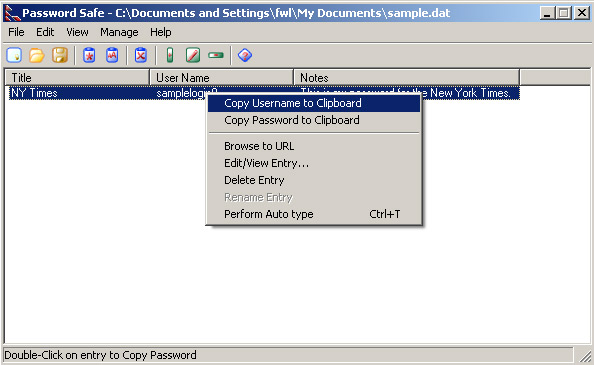
After pasting the username into website, you can double-click on the entry to speed-copy the password to the windows clipboard. Paste the password into the website and login as usual.

After a period of inactivity PasswordSafe will require the re-entry of the safe.s combination.

As more and more passwords are added to password safe, it becomes desirable to switch to “Nested Tree View” from the View menu. This changes the default display to the following:

Entries are developed into trees corresponding to the entry’s “group” field.
Changing Passwords with PasswordSafe
To change the password for a given entry, right-click on the entry and choose “Edit/View Entry”. The entry will then become available.
Click on “Show Password” and then “Generate” to generate a new password.

Once the password has been changed within password safe, don.t forget to update the password for the actual website or system with the new password!
There are a few other more advanced features of PasswordSafe that haven’t been covered here, but are adequately discussed in PasswordSafe’s help file. This introduction to PasswordSafe covers the basics enough to get started using it for password management. Here’s to never again forgetting a password!